If you’ve ever tried to log in to your ICICI FASTag account and got stuck at the customer ID field, you’re not alone. It’s one of the most common sticking points for FASTag users, mostly because the ID isn’t something you use every day. You set it up once, forget about it, and then need it exactly when you’re in a hurry at a toll booth.
This guide walks through what an ICICI FASTag customer ID actually is, the different ways to track it down, and what to do if it’s genuinely gone. For a broader look at getting started with ICICI FASTag in the first place, see our guide on how to apply for ICICI FASTag.
What Is an ICICI FASTag Customer ID?
Your ICICI FASTag customer ID is the unique reference number tied to your FASTag account with ICICI Bank. It’s separate from your vehicle registration number and separate from your wallet or tag ID, though the three are often confused with each other. The customer ID is mainly used for logging in, raising service requests, and identifying your account when you contact support.
Think of it the way you’d think of a customer ID for any bank account: it’s how the system recognises you behind the scenes, even though your day-to-day interactions (recharging, checking balance) don’t always require you to type it in.
Where Does the Customer ID Come From?
When you first apply for an ICICI FASTag, the ID is generated as part of your account setup and typically shows up in a few places:
- The welcome SMS sent after your FASTag is issued
- A confirmation email from ICICI Bank
- The physical FASTag purchase receipt, if you bought it at a POS or toll plaza
- Your account dashboard once you’ve logged in through the official channel
If you applied recently and haven’t misplaced these records, checking them first will save you a lot of back-and-forth.
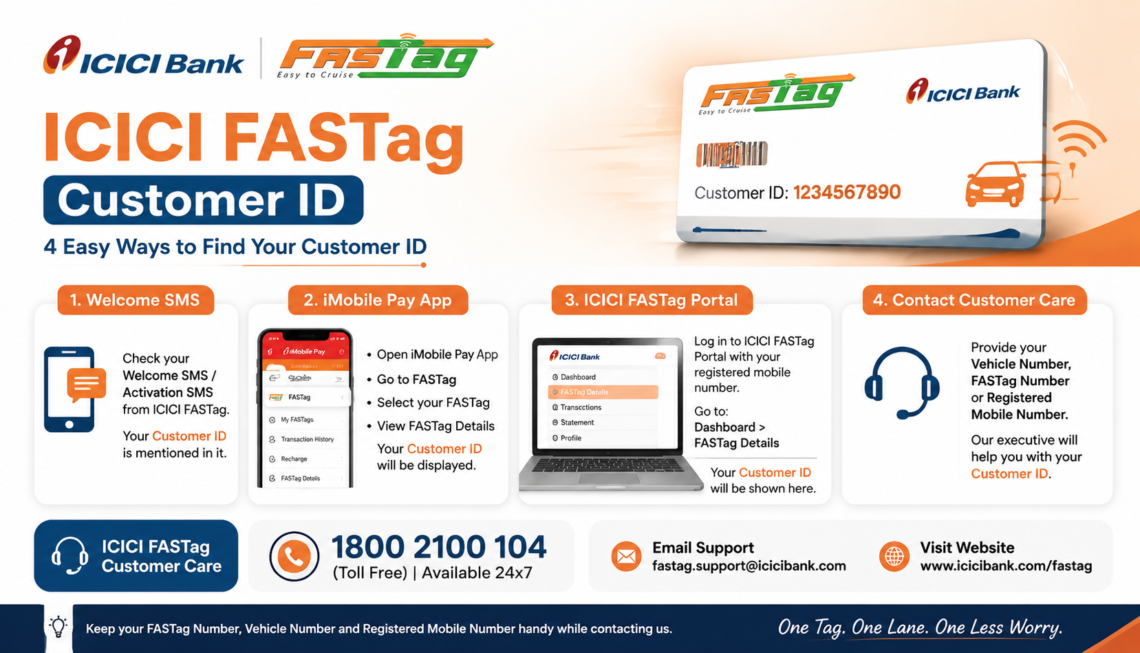
How to Find Your ICICI FASTag Customer ID
There isn’t one single method that works for everyone, since it depends on what you still have access to. Here’s a breakdown of the main options.
| Method | What You Need | Best For |
| Check the welcome SMS/email | Access to the phone or inbox used during signup | Users who registered recently |
| Log in with registered mobile number | An active, registered mobile number | An active, registered mobile number |
| Check the ICICI Bank app or Net Banking | An existing ICICI Bank account linked to FASTag | Users who already bank with ICICI |
| Review the FASTag purchase receipt | The physical or digital receipt from purchase | Users who bought FASTag at a toll plaza or POS |
| Contact customer support | Vehicle number, mobile number, or KYC details | Anyone who has exhausted the above options |
If mobile-number login isn’t working for you, it’s usually one of a few things: the number isn’t the one registered with FASTag, the OTP hasn’t arrived because of a network delay, or there have been too many failed attempts in a short window. Waiting a few minutes and trying again solves this more often than people expect.
Customer ID vs. Wallet ID vs. Tag ID: Why the Mix-Up Happens
A lot of the confusion around this topic comes from ICICI Bank using more than one identifier across its FASTag ecosystem. The customer ID identifies you as an account holder. The wallet ID is tied to the prepaid balance linked to your tag. The tag ID (sometimes printed on the tag itself) identifies the physical device fixed to your windscreen.
You won’t always need to know the difference in daily use, since recharging and checking balance are usually handled through your login rather than by typing in these numbers manually. But if you’re raising a support ticket or an unresolved toll dispute, having the right ID ready makes the process faster.
What to Do If You’ve Forgotten Your ICICI FASTag Customer ID
If none of your usual channels are giving you the ID, here’s a reasonable order to try things in:
- Search your SMS inbox for messages from ICICI Bank around the time you got your FASTag.
- Check your email for a FASTag welcome or confirmation message.
- Try logging in using your registered mobile number instead of the customer ID directly.
- Check the ICICI Bank app or Net Banking portal if you already have an ICICI account.
- If none of that works, contact ICICI Bank’s official FASTag support with your vehicle number and mobile number on hand.
Before reaching out to support, it helps to have your registered mobile number, vehicle number, and any transaction ID (if the issue involves a recharge or toll deduction) ready. Our ICICI FASTag customer care guide covers what details to keep on hand and how to reach the right team.
Using Your Customer ID Once You Have It
Once you’ve recovered your customer ID, it’s worth using it for the tasks that actually need it, rather than digging it up again next month.
That includes logging in through the ICICI FASTag login page, recharging your account, and pulling up your FASTag statement if you need a record of past toll deductions. If you manage a fleet or multiple vehicles, the process looks a little different, and it’s covered separately since business accounts have their own login flow.
A Word on Safety
FASTag accounts are tied directly to a payment method, so a bit of caution goes a long way. Never share your customer ID, OTP, or password with anyone claiming to be FASTag support over WhatsApp or an unofficial number.
ICICI Bank will not ask for your OTP over a phone call. If a website looks slightly off, or asks for more information than a login normally would, close it and go directly to the official ICICI Bank platform instead.
Frequently Asked Questions
- Is my ICICI FASTag customer ID the same as my vehicle number?
No. Your vehicle number identifies the vehicle, while the customer ID identifies your account with ICICI Bank. They’re often required together during login, but they’re not interchangeable.
- Can I log in to ICICI FASTag without my customer ID?
In many cases, yes. If your mobile number is registered with your account, you may be able to log in using OTP-based verification instead of typing in the customer ID directly.
- Where can I find my customer ID if I never saved the welcome message?
Try the ICICI Bank app or Net Banking if you already hold an account there, or contact official ICICI Bank FASTag support with your vehicle and mobile number.
- Does my customer ID change if I get a replacement FASTag?
This depends on how the replacement is processed. It’s best to confirm directly with ICICI Bank support at the time of replacement rather than assume it stays the same.
- Is it safe to share my customer ID with a third-party website?
No. Only enter your customer ID or any account details on the official ICICI Bank website or app. Third-party sites offering to “recover” your ID for you are not a safe route.
- What details should I keep ready when contacting support about my customer ID?
Your registered mobile number, vehicle number, and any related transaction ID, if the query involves a specific recharge or toll deduction, will help support resolve the issue faster.
Conclusion
Your ICICI FASTag customer ID isn’t something you’ll need constantly, which is exactly why it’s easy to lose track of. If you’re stuck, start with the basics: your SMS inbox, your registered mobile number, and the ICICI Bank app, before escalating to customer support. And once you’ve got it, keep it somewhere you’ll actually remember, so the next toll run doesn’t turn into a search party.