If you drive on Indian highways, you’ve probably run into a toll queue moving slower than it should. FASTag ICICI exists to fix exactly that problem. It lets your vehicle pass through toll plazas without stopping for cash, with the toll amount deducted straight from your linked wallet or account.
This guide covers what FASTag ICICI actually is, how to log in and manage your account, how recharges and balance checks work, and what to do when things go wrong (because they sometimes do; a blacklisted tag or a failed recharge is more common than people expect).
What Is FASTag ICICI?
FASTag ICICI is the FASTag service issued by ICICI Bank for electronic toll payment. The tag itself is a small RFID sticker fixed to your vehicle’s windscreen. When you drive through a toll plaza, a scanner reads the tag and deducts the toll fee from your linked FASTag account automatically. No cash, no rolling down the window, no fumbling for change.
For a full walkthrough of eligibility and how to apply, ICICI’s own guide to applying for ICICI FASTag covers the documents and steps in detail.
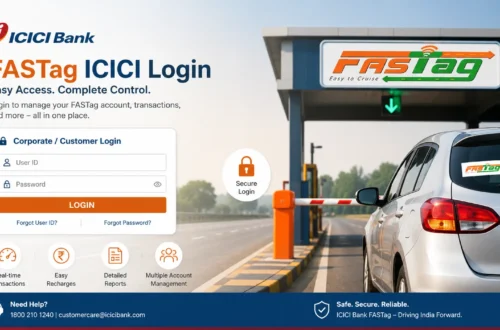
Logging Into Your FASTag ICICI Account
To manage your FASTag, you need to log in through ICICI Bank’s official channels, either the FASTag portal or ICICI’s digital banking platforms. The general process looks like this:
- Go to the official ICICI Bank FASTag page or the digital banking app.
- Select the FASTag login or customer login option.
- Enter your registered mobile number, customer ID, or vehicle number.
- Verify with an OTP or password if asked.
- You’re in. The dashboard shows your balance, linked vehicle, and recent transactions.
A lot of users specifically search for logging in with just a mobile number, usually because they’ve forgotten their customer ID. If your mobile number is registered against your FASTag account, OTP-based login should work. When it doesn’t, double-check that the number is active, wait out the OTP timer instead of retrying repeatedly, and rule out a network issue before assuming something’s broken. There’s a more detailed breakdown in this piece on ICICI FASTag login with mobile number if you’re stuck.
Login steps do shift occasionally as ICICI updates its platform, so treat the instructions on the official site as the current source of truth rather than anything cached elsewhere.
Checking Your FASTag ICICI Balance
Running low on balance mid-journey is the single most common reason a tag gets rejected at a toll booth. Checking it beforehand takes under a minute:
- Log in through the official ICICI Bank platform (app, Net Banking, or FASTag portal).
- Open the FASTag section.
- Select your linked vehicle.
- View your current balance and recent deductions.
Make it a habit to check before a long drive, not after you’re already stuck at the barrier. A more detailed step-by-step is available in this guide on how to check ICICI FASTag balance.
Recharging FASTag ICICI
When the balance runs low, recharging is straightforward through official channels:
- Open the ICICI Bank FASTag recharge page or app.
- Enter your FASTag or vehicle details.
- Pick a recharge amount.
- Choose a payment method.
- Complete the payment and confirm the balance has updated.
If money leaves your account but the balance doesn’t reflect it right away, don’t panic and don’t attempt the payment again immediately. Wait a bit, then check the transaction status before contacting support. The full recharge process, including what to do if a payment fails, is covered in the ICICI Bank FASTag recharge guide.
Downloading Your FASTag Statement
A FASTag statement is genuinely useful for expense claims, business vehicle tracking, or figuring out whether a toll deduction was actually correct. To get one:
- Log in to your official account.
- Open the FASTag dashboard.
- Select transaction history or statement.
- Choose your date range.
- View or download it.
Keep the transaction details handy before raising a dispute over any deduction that looks off.
Why FASTag ICICI Sometimes Doesn’t Work
A few reasons a tag might get rejected at the toll plaza:
- Low balance
- The tag has been blacklisted
- Physical damage to the tag
- Poor placement on the windscreen
- Outdated vehicle details
- Pending KYC
- A scanner or technical glitch at the plaza itself
If your tag stops working, resist the urge to peel it off or swap it for an unofficial one. Check your balance and account status first through official channels.
Blacklisted FASTag: What It Means
A blacklisted FASTag is one that toll systems won’t accept for a normal deduction. It usually comes down to low balance, incomplete KYC, or account issues. Fixing it generally means recharging, confirming your KYC is done, checking the tag is properly fixed, and contacting ICICI support if none of that resolves it. Avoid any third-party site offering to “fix” a blacklisted tag for a fee. That’s not how it works, and it’s a common scam angle.
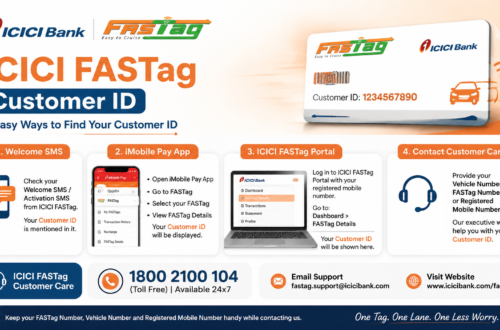
Forgot Your FASTag Customer ID?
This happens more than you’d think. A few things to try before calling support:
- Search old SMS messages from ICICI Bank about your FASTag.
- Check your original welcome email.
- Try logging in with your registered mobile number.
- Look through the ICICI Bank app or Net Banking.
Never hand over an OTP, password, or full account details to a website or number you haven’t verified as official.
Updating Vehicle Details or Getting a Replacement
If you registered with temporary plates or your vehicle information changed, you can update it through the official ICICI Bank app or FASTag account section. A physical replacement is usually needed if the tag is damaged, unreadable, lost, or if the windscreen it was fixed to has been replaced. Both processes should go through official ICICI Bank channels only, not a middleman.
Managing FASTag Through the ICICI App
Beyond the browser, ICICI Bank’s app covers most of what you’d need: checking balance, recharging, viewing linked vehicles, and downloading statements. If you’d rather not deal with a browser login every time, the ICICI FASTag app guide walks through download, setup, and everyday use.
Getting Help: FASTag ICICI Customer Care
If login, recharge, KYC, or blacklist issues persist, ICICI Bank’s official customer support is the right place to go, not a random number found through a search engine. Before you call, have these ready:
- Registered mobile number
- Vehicle number
- Customer ID or wallet ID, if you have it
- Transaction ID for payment issues
- Date and time of the disputed toll deduction
- Toll plaza name, if known
For every official way to reach support, see the ICICI FASTag customer care number page, or the broader ICICI FASTag customer care overview.
Closing a FASTag Account
If you’re selling your vehicle or switching providers, you’ll need to close the FASTag account rather than just letting it sit idle. The process and what to watch out for (outstanding balance, linked KYC) are covered in this guide on how to close ICICI FASTag.
Staying Safe With FASTag ICICI
A few habits worth keeping:
- Only use the official ICICI Bank website or app.
- Never enter an OTP on a site you haven’t verified.
- Ignore unsolicited FASTag “annual pass” offers. They’re almost always fake.
- Don’t trust WhatsApp numbers claiming to be FASTag support.
- Double-check the URL before logging in anywhere.
FAQs About FASTag ICICI
What is FASTag ICICI login?
It’s accessing your ICICI FASTag account through official ICICI Bank channels to check your balance, recharge, view transactions, or download statements.
Can I check my FASTag ICICI balance online?
Yes, through the ICICI Bank app, Net Banking, or the FASTag portal.
Can I recharge FASTag ICICI online?
Yes, using official or authorised payment options only.
Why is my FASTag ICICI not working?
Usually low balance, blacklist status, a damaged tag, or a KYC issue. Check your account status first.
What if a recharge fails but money gets deducted?
Note the transaction ID, amount, and time, then wait for the refund window before contacting support.
Is icicifastaglogin.org an official ICICI website?
No. It’s an independent informational guide. For any login, payment, or account action, use ICICI Bank’s official website or app.
Final Thoughts
FASTag ICICI removes the hassle of cash payments at toll booths, but like any linked financial account, it needs a bit of upkeep: checking your balance before long trips, keeping KYC current, and knowing where to go when something breaks. Bookmark the official ICICI Bank FASTag page, skip anything that looks like a shortcut from an unofficial site, and most issues sort themselves out within a call or two to support.